

TheBankTodayTheBankTodayTheBankToday
Notification Show More
Font ResizerAa
  • Home
  • Banking
  • Credit Cards
  • Loans
  • Personal Finance
  • Guides
  • Latest Updates
  • Compare Credit Cards
Reading: Use UPI to withdraw Cash from ATM
Share
Font ResizerAa
TheBankTodayTheBankToday
  • Home
  • Banking
  • Credit Cards
  • Loans
  • Personal Finance
  • Guides
  • Latest Updates
  • Compare Credit Cards
Search
  • Home
  • Banking
  • Credit Cards
  • Loans
  • Personal Finance
  • Guides
  • Latest Updates
  • Compare Credit Cards
Have an existing account? Sign In
Follow US

Home » Important

upi 9
Important

Use UPI to withdraw Cash from ATM

Takendra Verma
Last updated: 09/03/2026 1:29 PM
Takendra Verma
Published: 09/03/2026
Share
SHARE

If you forget your ATM card at home but still need cash, there is no need to worry.

Contents
What Is UPI Cardless Cash Withdrawal?Step-by-Step: How to Withdraw Cash Using UPI at an ATMImportant Things to Know

In India, you can now withdraw money from an ATM using UPI, even without a debit card.

This feature makes cash withdrawal much easier.

You don’t have to carry your ATM card all the time, and it also reduces the risk of card theft, loss, or cloning.

Many banks and UPI apps support this facility, making it a convenient option for users.

What Is UPI Cardless Cash Withdrawal?

UPI-based ATM withdrawal works through a system called Interoperable Cardless Cash Withdrawal (ICCW).

With this system, you can withdraw cash directly from an ATM by scanning a QR code using your UPI app.

Several banks in India already support this feature, including State Bank of India and Bank of Baroda.

As long as the ATM supports UPI withdrawal, you can use this service.

The best part is that the entire process is completely cardless, which makes it safer and more convenient for users.

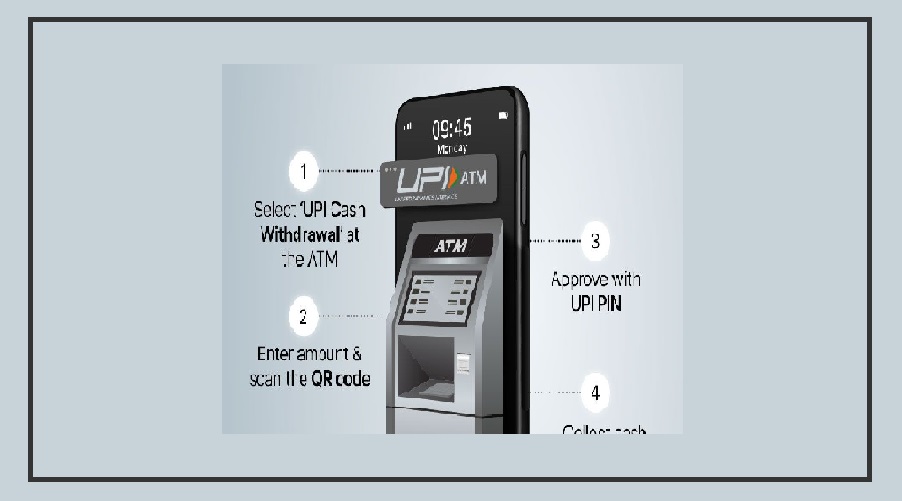
Step-by-Step: How to Withdraw Cash Using UPI at an ATM

Withdrawing cash through UPI is very simple. Just follow these steps:

First, find an ATM that supports UPI cardless cash withdrawal.

On the ATM screen, select the UPI Cash Withdrawal option.

Next, enter the amount you want to withdraw.

The maximum withdrawal limit is ₹10,000 per transaction.

After entering the amount, a QR code will appear on the ATM screen.

Now open your UPI app and scan the QR code.

Popular apps like BHIM, Paytm, Google Pay, and PhonePe support this feature.

Then select your linked bank account and enter your 4 or 6-digit UPI PIN for verification.

Once the transaction is confirmed, the ATM will dispense the cash immediately.

Important Things to Know

UPI-based ATM withdrawal is a safe and easy option because it removes the need for a physical debit card.

This helps reduce the risks of card loss, theft, or cloning.

The maximum limit is ₹10,000 per transaction, although the exact limit may vary depending on the bank and your daily UPI transaction limits.

As UPI services continue to expand in India, more banks and ATMs are expected to support this cardless cash withdrawal feature, making it even easier for users to access their money.


You Might Also Like

Easy way to get ATM money
US Makes Major Changes to OPT Rules for International Students
Air India Express Offers 20% Flight Discount for Delhi Half Marathon
SEBI Lowers Social Impact Fund Entry to Rs 1,000
December 31st Deadline for Farmers to Get Govt Support
Share This Article
Facebook Email Print
Leave a Comment

Leave a Reply Cancel reply

Your email address will not be published. Required fields are marked *

Difference Between NEFT and RTGS

Get Latest Updates

Important banking and money updates, delivered without the clutter.
Thank you! You are subscribed. Please check your inbox for the welcome email.

Popular Updates

Bank Strike result
IDBI Bank Strike on November 2 and 3
23/10/2026
rupee1
Himachal Pradesh DA Hike Takes Dearness Allowance to 50%
23/10/2026
rbi6
RBI Rate Hike May Push Fixed Deposit Interest Rates Higher
23/10/2026
sim
WhatsApp SIM Binding Rules Start January 1, 2027
23/10/2026
electricity
Bengaluru Electricity Bills to Rise for Three Months
23/10/2026

Tags

  • SBI
  • HDFC Bank
  • Bank Of Baroda
  • Central Bank
  • Central Bank Of India
  • register mobile number
  • Pan Card
  • What is Bank?
  • SBI Personal Loan
  • check bank balance

TheBankToday

TheBankToday publishes practical banking, personal-finance and financial-news explainers to help readers understand important updates and services.
Quick Links
  • About
  • Contact
  • Disclaimer
  • Join Us
  • T&C
  • Privacy Policy
  • Customize Interests
Important Links
  • Advertise With Us
  • Advertising Policy
  • Cookie Policy
  • Corrections Policy
  • Editorial Policy
  • Fact-Checking Policy
  • Grievance Redressal

Subscribe Us

Subscribe to our newsletter to get our newest articles instantly!

Thank you! You are subscribed. Please check your inbox for the welcome email.
© 2026 TheBankToday. All Rights Reserved.
Welcome Back!

Sign in to your account

Username or Email Address
Password

Lost your password?