

TheBankTodayTheBankTodayTheBankToday
Notification Show More
Font ResizerAa
  • Home
  • Banking
  • Credit Cards
  • Loans
  • Personal Finance
  • Guides
  • Latest Updates
  • Compare Credit Cards
Reading: UMANG App now mandatory for UAN Activation
Share
Font ResizerAa
TheBankTodayTheBankToday
  • Home
  • Banking
  • Credit Cards
  • Loans
  • Personal Finance
  • Guides
  • Latest Updates
  • Compare Credit Cards
Search
  • Home
  • Banking
  • Credit Cards
  • Loans
  • Personal Finance
  • Guides
  • Latest Updates
  • Compare Credit Cards
Have an existing account? Sign In
Follow US

Home » EPF

epfo result
EPFGovernment Schemes

UMANG App now mandatory for UAN Activation

Takendra Verma
Last updated: 17/04/2026 10:56 AM
Takendra Verma
Published: 17/04/2026
Share
SHARE

If you’ve been trying to activate your UAN on the EPFO website, you may have noticed something confusing.

Contents
Why UAN Activation Is ImportantWhat You Need Before You StartHow to Activate UAN Using UMANG AppWhat Has Changed in the Process?Things to Keep in Mind

The option is still visible, but it no longer works the same way.

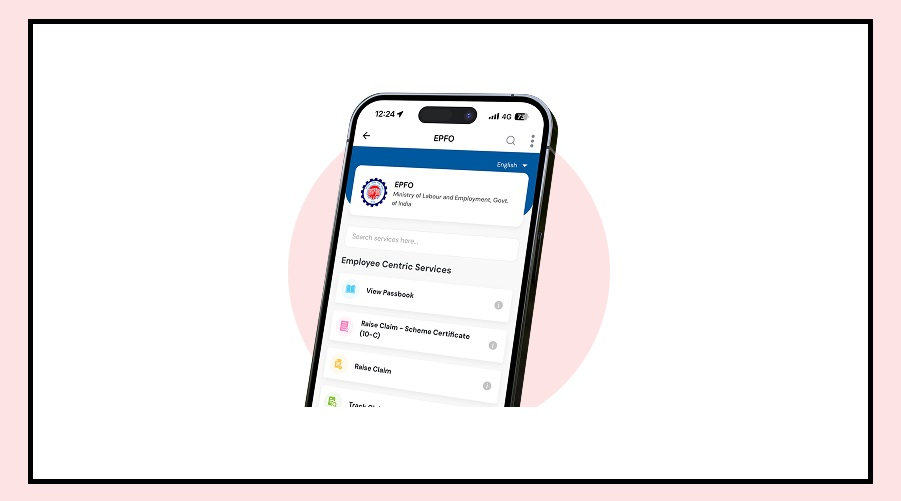
Now, when you click on it, you are redirected to the UMANG app.

This change has been made by the Employees’ Provident Fund Organisation, and UAN activation is now done only through the app.

Why UAN Activation Is Important

Your UAN (Universal Account Number) is the key to managing your PF account.

Once it is activated, you can:

Check your PF balance

View your passbook

Track contributions

Withdraw money when needed

It also becomes very useful when you change jobs, as it helps you transfer your PF easily.

Without activating your UAN, you won’t be able to access most EPFO services.

What You Need Before You Start

Before beginning the process, make sure you have a few important details ready.

You will need:

Your UAN number

Aadhaar number

Mobile number linked with Aadhaar

The OTP will be sent to your registered mobile number, so it must be active and correctly linked.

How to Activate UAN Using UMANG App

The process is simple and fully digital.

First, open the UMANG app and go to the EPFO section.

There, you will find the option for UAN activation.

Enter your UAN, Aadhaar number, and mobile number.

After that, you will receive an OTP on your phone.

In some cases, you may also need to complete Aadhaar-based face authentication.

Once everything is verified, your UAN will be activated, and you will receive a confirmation message.

What Has Changed in the Process?

Earlier, UAN activation could be done directly on the EPFO website.

Now, that option has been effectively removed, even though it still appears on the page.

The entire process has been shifted to the UMANG app.

This new method adds an extra layer of security through Aadhaar verification.

Things to Keep in Mind

Make sure your mobile number is linked with Aadhaar before starting the process.

Otherwise, you may face issues during OTP verification.

Also, double-check all details before submitting.

The good part is that UAN activation is a one-time process.

Once done, you can directly log in and use all EPFO services without repeating it.

With this update, EPFO is moving towards a more app-based and secure system, making it easier for users to manage their PF accounts digitally.


You Might Also Like

EPFO ECR Deadline Extended to October 31, 2026
5 Important EPFO updates Employees should Complete Now
EPFO Tightens Rules for PF Trusts
Big Gift for EPFO Pensioners in New Year
EPFO Nominee Rules You Should Know
Share This Article
Facebook Email Print
Leave a Comment

Leave a Reply Cancel reply

Your email address will not be published. Required fields are marked *

Difference Between NEFT and RTGS

Get Latest Updates

Important banking and money updates, delivered without the clutter.
Thank you! You are subscribed. Please check your inbox for the welcome email.

Popular Updates

ICICI Bank result
ICICI Bank Charges from December 1 (New Rates Explained)
24/10/2026
Infosys Logo result
Infosys Announces ₹26 Dividend as Q2 Profit Rises to ₹7,863 Crore
24/10/2026
Bank Holiday2 result
Bank Holidays November 2026 (Check State-Wise Closures)
24/10/2026
lpg
LPG Gas Cylinder Rules from November 1 (What Changes?)
24/10/2026
driving licence
Driving Licence Address Change May Soon Be Free
24/10/2026

Tags

  • SBI
  • HDFC Bank
  • Bank Of Baroda
  • Central Bank
  • Central Bank Of India
  • register mobile number
  • Pan Card
  • What is Bank?
  • SBI Personal Loan
  • check bank balance

TheBankToday

TheBankToday publishes practical banking, personal-finance and financial-news explainers to help readers understand important updates and services.
Quick Links
  • About
  • Contact
  • Disclaimer
  • Join Us
  • T&C
  • Privacy Policy
  • Customize Interests
Important Links
  • Advertise With Us
  • Advertising Policy
  • Cookie Policy
  • Corrections Policy
  • Editorial Policy
  • Fact-Checking Policy
  • Grievance Redressal

Subscribe Us

Subscribe to our newsletter to get our newest articles instantly!

Thank you! You are subscribed. Please check your inbox for the welcome email.
© 2026 TheBankToday. All Rights Reserved.
Welcome Back!

Sign in to your account

Username or Email Address
Password

Lost your password?